GolfEx sends two kinds of text, from two separate numbers. Each is optional, each needs its own consent in the GolfEx app, and you can stop either at any time. Texts are sent by GolfEx for the golf course you’re playing.
GolfEx Chat
Messages from the course’s pro shop during your round, such as a cart on its way, and notices the course sends to golfers on the course. The app is the normal way to get pro shop messages; a text is sent only when one hasn’t reached you in the app. You can reply by text, and your reply goes to the pro shop. Message frequency varies.
- GolfEx: Wolf Creek pro shop texts are on. Msg frequency varies. Msg & data rates may apply. Reply HELP for help, STOP to opt out.
- Dana Whitfield, Wolf Creek: Your cart is on its way. Open GolfEx to reply.
GolfEx Alerts
Safety alerts during your round: an evacuation, lightning nearby or high wind, urgent safety notices from course staff, and a notice if live alerts stop working. These are sent only when conditions at your course require them. Msg frequency varies.
- GolfEx: Wolf Creek evacuation and weather texts are on. Msg & data rates may apply. Reply HELP for help, STOP to opt out.
- EVACUATE - leave the course now. Nearest shelter: Shelter by the 7th green. -Wolf Creek (GolfEx)
- LIGHTNING - leave course now. Nearest shelter: Halfway house. -Wolf Creek (GolfEx)
- HIGH WIND - stop play and secure carts. Wait for the all-clear. -Wolf Creek (GolfEx)
- LIVE ALERTS DOWN - follow the posted lightning protocol. -Wolf Creek (GolfEx)
How to opt in
Consent is given in the GolfEx app only. There’s no opt-in at check-in or at the pro shop, and course staff can’t sign you up.
- Your course invites you, and you sign in to the GolfEx app.
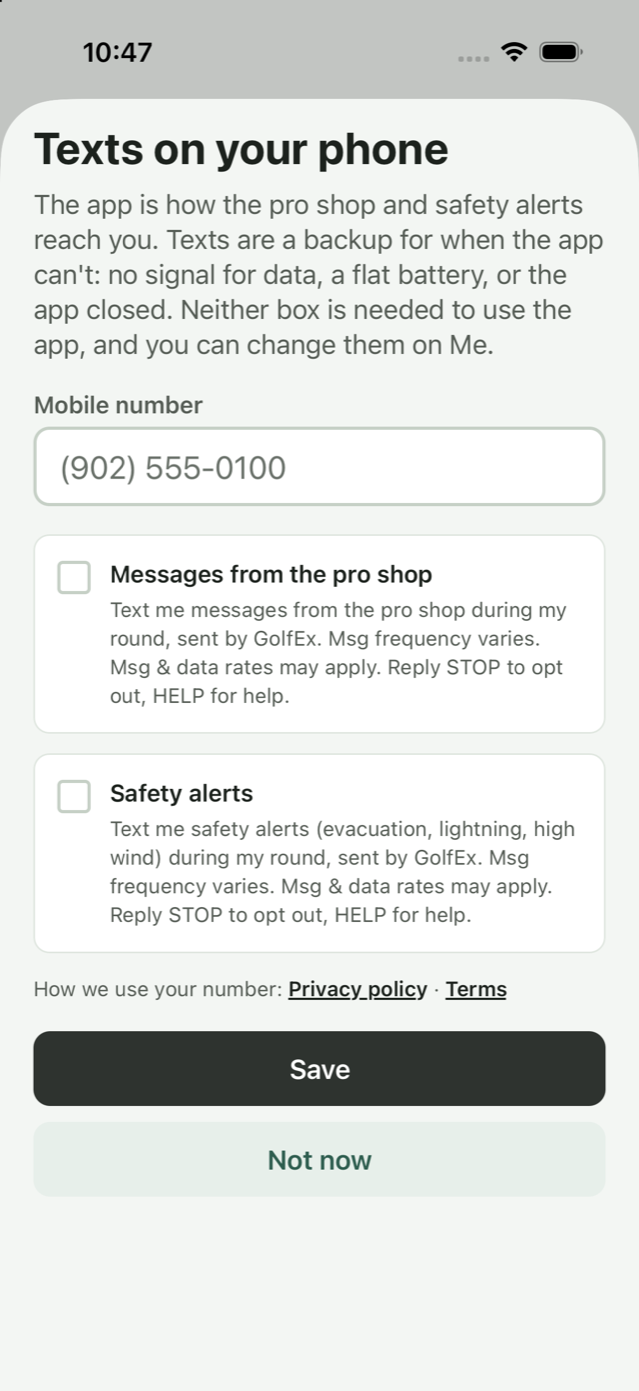
- The app shows the Texts on your phone screen once. Enter your mobile number and tick the box for each program you want. Both boxes start unticked, and you can use the app without ticking either.
- GolfEx sends one text from that program to confirm you joined.
- To join later, open Me and tap Texts. To switch a program off, use its switch on Me.
The two boxes say, word for word:
Text me messages from the pro shop during my round, sent by GolfEx. Msg frequency varies. Msg & data rates may apply. Reply STOP to opt out, HELP for help.
Text me safety alerts (evacuation, lightning, high wind) during my round, sent by GolfEx. Msg frequency varies. Msg & data rates may apply. Reply STOP to opt out, HELP for help.
Stopping and help
- Reply STOP to any text to stop that program. Each program has its own number, so stopping one doesn’t stop the other. You can also switch either off in the app, on Me.
- Reply HELP to any text for help, or email apps@golfex.io.
- Msg & data rates may apply.
- Carriers are not liable for delayed or undelivered messages.
Your number
GolfEx LLC does not sell, rent or share mobile phone numbers or SMS opt-in consent with third parties or affiliates for marketing or promotional purposes. Text messaging opt-in data and consent will not be shared with any third parties.
See the privacy policy and the terms.